
Project 1: GPS-based NTP server
Source: Microsecond accurate NTP with a Raspberry Pi and PPS GPS
Info
This page describes setting up a GPS module with a Pi. The GPS module needs to have a 3-5V input, with serial AND PPS outputs (5 pins minimum). Example: Adafruit Ultimate GPS Breakout.
Setup:
-
Install packages:
sudo apt install pps-tools gpsd gpsd-clients gpsd-tools chrony('pps/gpsd' packages are for interperating GPS data, chrony is an NTP server)
-
Add these lines to the end of
/boot/config.txt# the next 3 lines are for GPS PPS signals dtoverlay=pps-gpio,gpiopin=18 enable_uart=1 init_uart_baud=9600 -
Add this text to the end of
/etc/modules:pps-gpio
These programs and config changes enable PPS time sync inputs on GPIO pin 18 (real Pin 12), and initializes the serial COM port with a baud rate of 9600.
sudo systemctl mask serial-getty@ttyS0.service
This prevents the system from taking control of the port. /dev/ttyS0 should be owned by root:dialout and have permissions crw-rw---- after rebooting.
Wire up the GPS module:
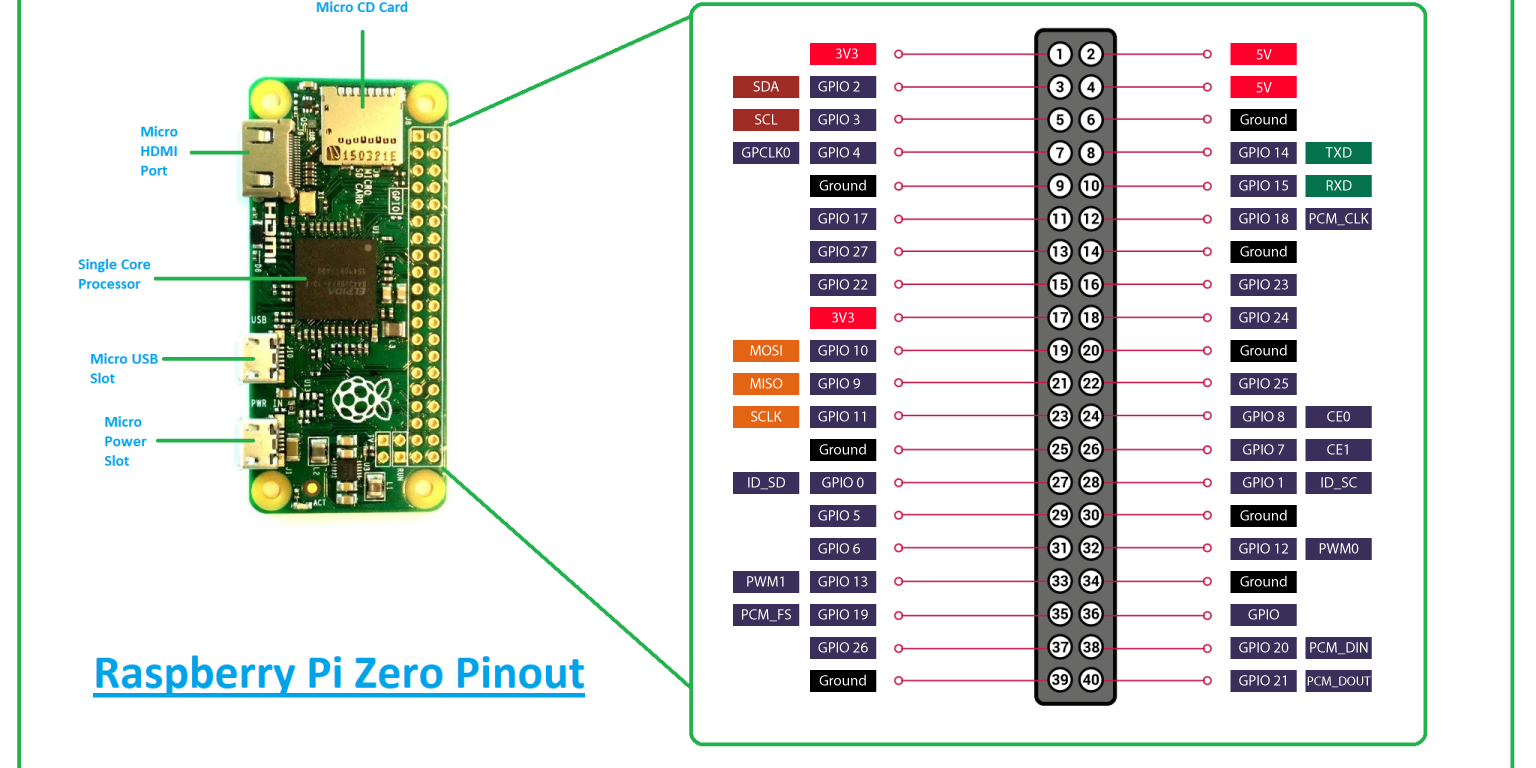
Pinout:
- GPS PPS to RPi pin 12 (GPIO 18)
- GPS VIN to RPi pin 2 or 4
- GPS GND to RPi pin 6
- GPS RX to RPi pin 8
- GPS TX to RPi pin 10
Picture reference (note that all the Pi pins are seqential):
Check GPS functionality
TBDThe GPS device should put out either 3.3V or 5V on the antenna connector to power the antenna. With the GPS module powered, there an LED will light to indicate power. The LED will start blinking once it has found a GPS lock. The module spits data to the serial lines at all times, there is no bi-directional communication!
lsmod | grep pps
Should return at least the service pps_core.
sudo ppstest /dev/pps0

### Output:
trying PPS source "/dev/pps0"
found PPS source "/dev/pps0"
ok, found 1 source(s), now start fetching data...
source 0 - assert 1655253832.999996389, sequence: 966 - clear  0.000000000, sequence: 0
source 0 - assert 1655253834.000004254, sequence: 967 - clear  0.000000000, sequence: 0
source 0 - assert 1655253835.000001120, sequence: 968 - clear  0.000000000, sequence: 0
source 0 - assert 1655253836.000000985, sequence: 969 - clear  0.000000000, sequence: 0
source 0 - assert 1655253836.999996852, sequence: 970 - clear  0.000000000, sequence: 0
source 0 - assert 1655253838.000001719, sequence: 971 - clear  0.000000000, sequence: 0
source 0 - assert 1655253839.000002586, sequence: 972 - clear  0.000000000, sequence: 0
source 0 - assert 1655253840.000001453, sequence: 973 - clear  0.000000000, sequence: 0
### ...etc
If there is a timout, then there is likely not a good GPS lock yet.
Set up software:
/etc/default/gpsd:
GPSD_OPTIONS=”” to GPSD_OPTIONS=”-n”
change START_DAEMON="false" to START_DAEMON="true"
change DEVICES=”” to DEVICES=”/dev/ttyS0 /dev/pps0″
edit /etc/chrony/chrony.conf file, add this block of code to the top:
### GPS TIME SYNC INFO
# delay determined experimentally by setting noselect then monitoring for a few hours
# offset 0.120 means the NMEA serial source lags PPS by 120ms
# adjust offset if NMEA source is off by more than 10ms in chrony
refclock SHM 0 offset 0.120 refid NMEA
refclock PPS /dev/pps0 refid PPS

# allow LAN devices to access chrony as an ntp server:
allow 192.168.1.0/24
allow 192.168.2.0/24

### END GPS TIME SYNC INFO
gpsmon, it should display a window similar to this:
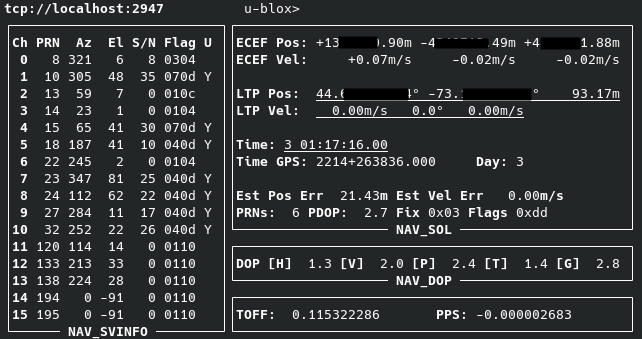
This confirms that the software is decoding the GPS info properly.
chronyc sources
### Output:
MS Name/IP address         Stratum Poll Reach LastRx Last sample
===============================================================================
#- NMEA                          0   4   377    15  +3794us[+3794us] +/-  470us
#* PPS                           0   4   377    16   +351ns[ +515ns] +/- 3000ns
^- time.cloudflare.com           3   6   377    70  -2009us[-2008us] +/-   16ms
^- smtp.us.naz.com               2   6   377     2    -26ms[  -26ms] +/-  105ms
^- hc-007-ntp1.weber.edu         2   6   377     5  +3131us[+3131us] +/-   72ms
^- dns2.kcweb.net                2   6   377     6  +1296us[+1296us] +/-   88ms
chrony.conf file to adjust this value, and restart chrony with the command sudo systemctl restart chrony.
Set up other machines to use the Pi as an NTP server (Linux):
ntp package on the machine
Edit /etc/ntp.conf and add server [pi.local.ip] to the list of servers
start the ntp service (on Arch: sudo systemctl start ntpd)
Check the NTP sources with ntpq -p:
remote           refid      st t when poll reach   delay   offset  jitter
==============================================================================
 192.168.1.137   .PPS.            1 u   35   64    1    1.851  +144501   0.001
 time.walb.tech  50.205.244.21    3 u   34   64    1   82.802  +144501   0.001
 li1187-193.memb 132.163.96.3     2 u   30   64    1  179.522  +144501   0.001
 time-dfw.0xt.ca 68.166.61.255    2 u   33   64    1  106.817  +144501   0.001
 LAX.CALTICK.NET 17.253.26.253    2 u   32   64    1  118.527  +144501   0.001